
Microsoft is retiring SMS text message and phone-call authentication. Students, faculty and staff who currently use these methods must set up another Multifactor Authentication (MFA) method before their deadline (noted below) or they will be unable to access university services.
If you currently use text messages or phone calls to verify your identity when signing in, you must set up another authentication method before the applicable deadline.
Users who rely on either method will be unable to access university services — including but not limited to Outlook email, Canvas and more — until another authentication method is set up.
Important Deadlines
| Date | What's changing |
|---|---|
| December 1, 2026 | Voice phone call authentication will no longer be available. |
| July 1, 2027 | SMS text authentication will no longer be available. |
What do I need to do?
Those who do not set up another MFA method by the deadlines above will not be able to sign in to secure university resources until they do so. Most users can complete setup in less than 10 minutes.
- Step 1: Download the Microsoft Authenticator app to your phone.
- Step 2: Register the app with your university account.
- Refer to these step-by-step instructions
- Watch this video walkthrough
- Step 3: Begin using the Microsoft Authenticator app when signing in to university services.
- Step 4: Once you have set up the Microsoft Authenticator app, consider upgrading to a phishing-resistant authentication method such as a Passkey in the app.
Not sure whether these changes affect you?
Not sure whether these changes affect you?
Review your current authentication methods at Microsoft's Security page. If the authentication methods listed are:
- Text message
- Phone call
You must enroll in another authentication method before your deadline.
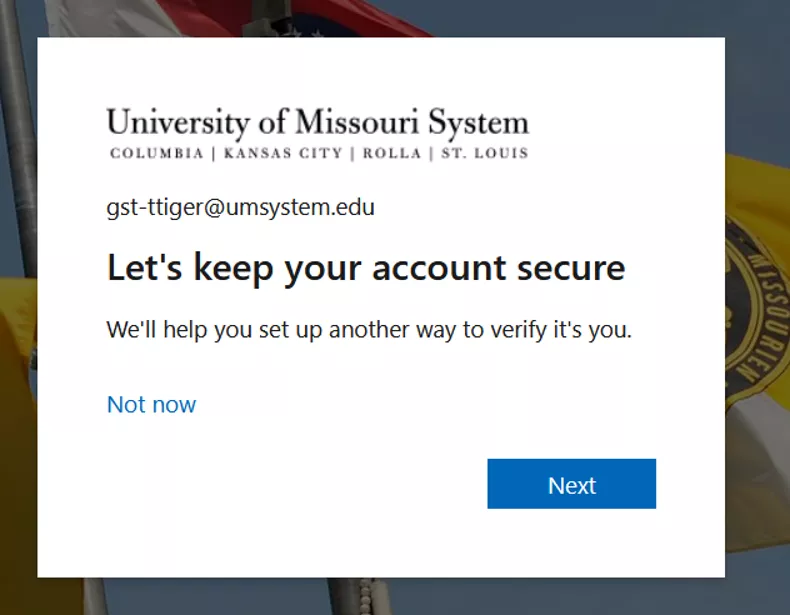
Microsoft’s 'Protect your account' prompt
Microsoft’s 'Protect your account' prompt
To help with this transition, Microsoft is beginning to “nudge” users with SMS text message codes or voice phone calls to change to another MFA method when they sign in to a university secure resource requiring MFA. You can either click “Next” to follow the prompt to register another MFA method or click “Not now” to postpone the process for the next 24 hours. However, you will continue to receive the prompt every time you sign in until you update your MFA method.
Prepare for the future. Set up phishing-resistant authentication for the strongest protection.
Prepare for the future. Set up phishing-resistant authentication for the strongest protection.
Moving to Microsoft Authenticator is an important first step toward stronger account security. Once you’ve enrolled in Microsoft Authenticator, consider upgrading to a phishing-resistant authentication method. In the near future, you will need to have one of these methods established to access certain secure university resources.
These methods are designed to stop phishing attacks and provide the highest level of account protection.
Frequently Asked Questions
Frequently Asked Questions
Microsoft will no longer support older authentication methods such as text messages and phone calls in favor of more secure options. Older authentication methods are also easier for attackers to target through phishing attacks and other scams. Moving to the Microsoft Authenticator app provides stronger protection.
Users who do not enroll in another authentication method before their deadline may be unable to sign in to university services until setup is completed. This will affect access to:
- Canvas
- Microsoft 365
- Other university systems
Alternative authentication methods are available, including:
Contact your campus IT Help Desk if you need assistance choosing an alternative.
Need help?
Need help?
While most users can complete setup in less than 10 minutes, support is available through your campus IT Help Desk if you:
- Need assistance installing Microsoft Authenticator
- Prefer not to use a personal device
- Require accessibility accommodations
Contact your campus IT Help Desk
- Mizzou: 573-882-5000 or Mizzou Self-Service Portal
- UMKC: 816-235-2000 or UMKC Self-Service Portal
- Missouri S&T: 573-341-4357 or S&T Self-Service Portal
- UMSL: 314-516-6034 or UMSL Self-Service Portal
- MU Health Care: 573-884-4357 or MUHC Self-Service Portal